PrivWindoze is a free, portable utility designed to identify and remove intrusive and potentially unwanted software. No installation is required — simply run the program, scan your system, and review the results stored in a log file.
Key Features
- Start the tool and take a sip of coffee while the scanner does its job. While you lose some control compared to other tools of its nature, the developer is someone who has been into computer optimization for over 20 years
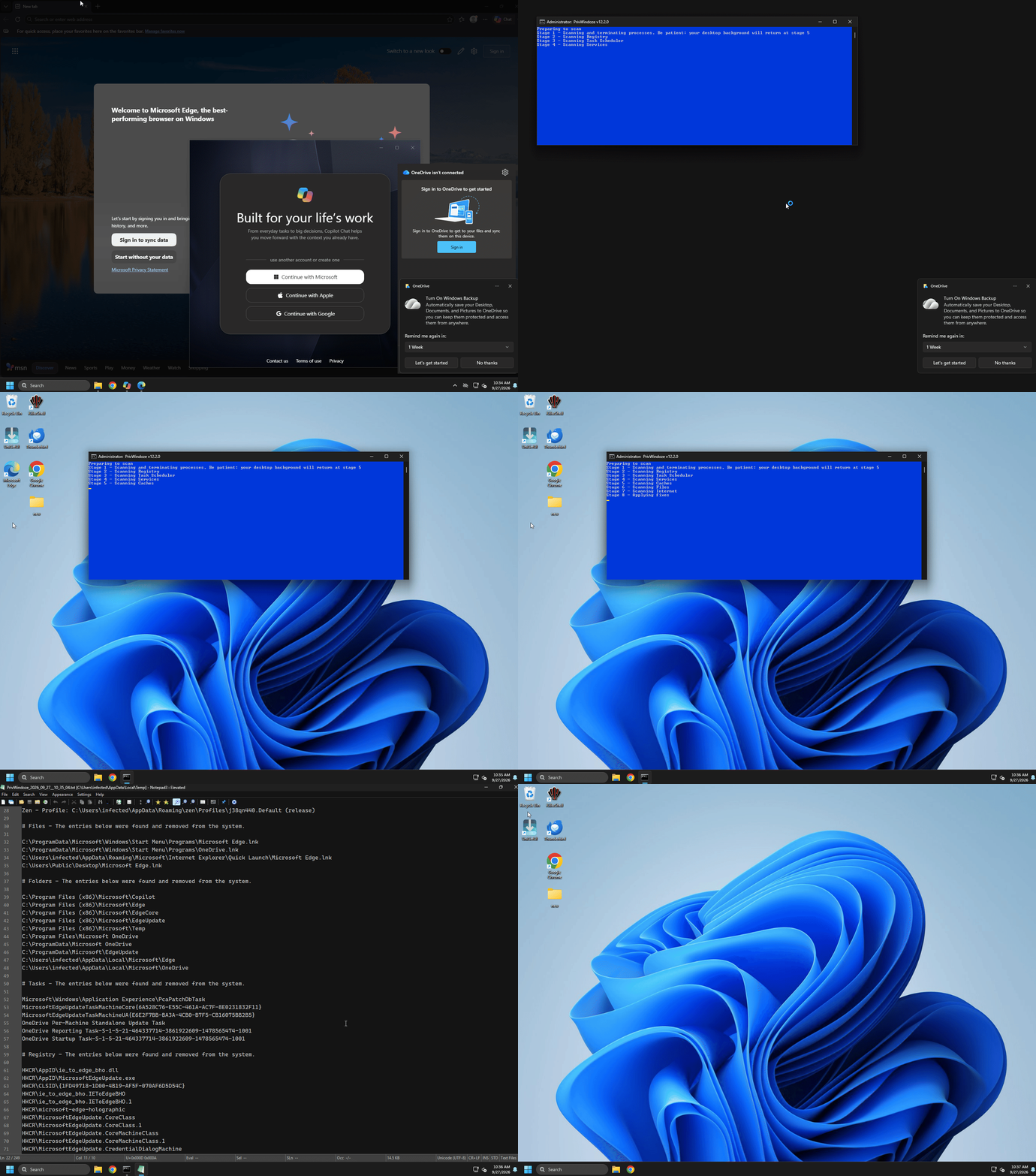
- Takes a halberd to Microsoft Copilot, Edge, OneDrive, and Xbox
- Disables telemetry and removes OEM bloatware automatically
- Several software will have their caches cleared automatically
- Preference of maintaining environmental legitimacy which lowers tool size and helps catch 0-day threats
- Global reach: 30+ languages supported
- Generates a detailed diagnostic log of its findings and removals
- Removed items are placed into a quarantine folder
- Respects user privacy (no data is collected or transmitted)
- By design, the tool contends to be even faster than wiping and reloading the operating system. Your documents are safe from scans.
Supported Platforms
- Windows 10, and 11
- 32-bit and 64-bit systems
- Recommended to run with Administrator privileges
Usage Instructions
- Download the tool (approx. 5 MB)
- Right-click the file and choose Run as administrator
- Allow the scan to complete
- Review the log to see detected items and actions taken
If you are working with a technician, share the log file to assist in diagnosing issues.
License & Support
PrivWindoze is offered free of charge. If you find the tool helpful, you may support ongoing development via donation.
Contributors & Translators
- Dragokas: Helped me test and troubleshoot bugs I encountered early on. For example, getting Cyrillic characters to print correctly in the log and in console was a major challenge. He also created a small tool to replace Nircmd, which is the dialog box with the Disclaimer. Lastly he helped with translating into Russian. A very special thanks to him!
- M-K-D-B: Provided suggestions, feedback, and helped with translating into German
- Picasso: Provided suggestions, feedback, and helped with translating into Polish
- JSntgRvr: Provided suggestions and feedback
- AdvancedSetup: Provided suggestions, feedback, and implementing boilerplates for members of Malwarebytes
- Akok: Helped with creating and updating guides for members of SafeZone
- Chicloi: Helped with creating and updating guides for members of ForoSpyware
- Marcelo: Helped with creating and updating guides for members of ForoSpyware
- Sandor: Provided suggestions, feedback, and helped with translating into Russian
- Regist: Helped with Russian translations
- Maxstar: Helped with Dutch translations
Technical Information
The tool does not create a system restore point on its own
The tool prefers to quarantine items instead of deleting them
The tool prefers whitelisting software related entries rather than maintaining a blacklist
The Miscellaneous section of the log provides extra details gathered from the computer that could be useful for troubleshooting:
During “Stage 7 – Scanning Internet”, the following browser preferences for Chromium based browsers are returned to their defaults (none allowed): Permission Access for Browser Notifications, Camera Access, Microphone Access, Allowed Popups, Geolocation Access, and “Keep everything synced” setting is turned OFF. The user is not signed out of any existing services. Just the setting is reverted to its default of ‘false’. For Gecko based browsers, currently only Permission Access for Browser Notifications is turned off.
List of anti-virus software installed
Versions of Windows Defender, Brave, Google Chrome, and Microsoft Edge found
If Lightspeed network filter is installed
Event Viewer logs detailing Windows Defender crashes and recent system boot times
If important system files are missing
Quarantine contents from not only PrivWindoze, but also DrWeb, Farbar Recovery Scan Tool, and TDSSKiller — Present month only
Scan logs from other tools such as AdwCleaner, AutoLogger, HitmanPro, Malwarebytes, RogueKiller, and TDSSKiller — Present month only
Windows Debugger logs from CrashDumps and Minidumps folders — Present month only